KI-Aktion
Das Arbeitspferd jeder KI-gestützten Automation: Ein KI-Modell bearbeitet eine Aufgabe und Sie erhalten die Antwort – zusammenfassen, übersetzen, einordnen, auslesen, entwerfen, Fragen beantworten.
Funktionsweise
Der Schritt schickt Ihre Anweisung und die Anfrage (meist etwas aus dem Speicher – die eingegangene Mail, das Ergebnis des vorigen Schritts) an ein KI-Modell und schreibt die Antwort in den Speicher. Andere Schritte können die Antwort dann lesen, weiterschicken, ablegen oder als Eingabe für einen weiteren Schritt verwenden.
Wenn Sie Wissensbasen verbinden, sucht der Schritt zuerst nach passenden Inhalten und kann seine Suche über mehrere Runden verfeinern, bevor er antwortet. Ohne Wissensbasen antwortet er aus der Anfrage, dem Kontext und dem eigenen Wissen des Modells.
Für eine einfache Aufgabe – eine Frage, eine Antwort – stellen Sie Aufwand auf Niedrig: eine Antwort ohne Verbesserungsrunden. Das ist die schnellste und günstigste Einstellung.
Einstellungen
| Feld | Was es steuert | Erforderlich | Hinweise |
|---|---|---|---|
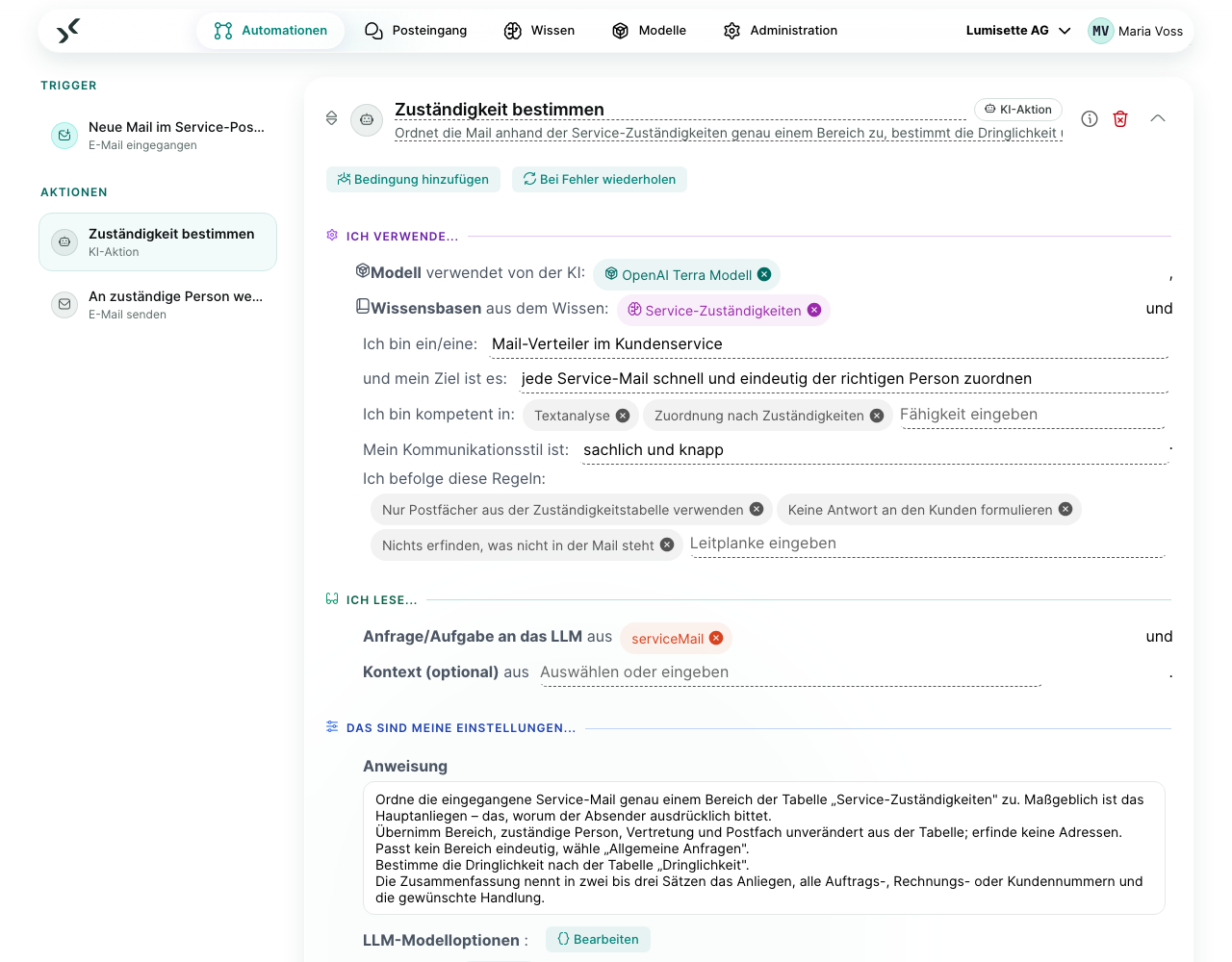
| Modell | Welches KI-Modell die Arbeit erledigt. | erforderlich | Auswahl aus den im Workspace verbundenen Modellen. Siehe Modelle. |
| Wissensbasen | Wissensbasen, die der Schritt durchsuchen darf. | optional | Leer: keine Suche. |
| Persona | Rolle, Ziel, Fähigkeiten, Kommunikationsstil und Regeln der KI. | optional | |
| Anfrage/Aufgabe an das LLM | Die eigentliche Frage oder Aufgabe, aus dem Speicher. | erforderlich | Das ist die „Benutzernachricht“, die die KI sieht. |
| Kontext (optional) | Weitere Ergebnisse früherer Schritte, die die KI kennen soll. | optional | Zum Beispiel der Kundendatensatz aus dem vorigen Schritt. Mehrere Einträge möglich. |
| Anweisung | Der Auftrag an die KI: was sie tun soll und welche Regeln gelten. | empfohlen | Ein mehrzeiliges Feld – schreiben Sie so viel wie nötig, mit Absätzen und Listen. |
| LLM-Modelloptionen | Anbieterspezifische Parameter (Temperatur, maximale Token). | optional | Die Standardwerte sind sinnvoll. |
| Aufwand | Wie gründlich der Schritt arbeitet: Verbesserungsrunden, Wissensabschnitte, Modellaufrufe und – wo das Modell es unterstützt – Denkaufwand. | optional | Standard Mittel. Niedrig für einfache Aufgaben; erhöhen Sie ihn nur, wenn die Antwort mehrere Runden braucht. Siehe Aufwand. |
| Ausgabeformat | Freitext, JSON oder Felder, die Sie beschreiben. | optional | Verwenden Sie Strukturierte Felder, wenn spätere Schritte bestimmte Felder brauchen. |
| Textinhalt vom LLM | Die Antwort. | erforderlich | Das lesen spätere Schritte meistens. |
| Datenobjekt vom LLM (optional) | Das vollständige Antwortobjekt. | optional | Enthält Angaben zu den Iterationen. |
Beispielszenarien
Tägliche Ticket-Zusammenfassung. Ein Workflow holt die Support-Tickets von gestern, übergibt sie einer KI-Aktion mit der Anweisung „Sie sind Support-Analyst. Gruppieren Sie die Tickets nach Priorität und schreiben Sie eine Zusammenfassung in einem Absatz.“ und dem Aufwand Niedrig und schickt das Ergebnis per E-Mail an die Teamleitung.
Recherche-Assistent. Geht ein neues Kundenticket ein, liest eine KI-Aktion, die mit der Wissensbasis zum Produkt verbunden ist, das Ticket, sucht die passenden Abschnitte, verfeinert ihre Suche, wenn die ersten Treffer am Thema vorbeigehen, und entwirft eine Antwort für das Support-Team.
Empfehlungen
- ✅ Schreiben Sie Vorgaben zum Stil („Verwenden Sie Aufzählungspunkte. Höchstens 200 Wörter.“) in die Anweisung, nicht in die Anfrage.
- ✅ Verwenden Sie die Ausgabe Strukturierte Felder, wenn ein späterer Schritt bestimmte Felder lesen muss. Freitext auszuwerten ist fehleranfällig.
- ✅ Verbinden Sie nur die Wissensbasen, die wirklich passen. Jede zusätzliche kostet Zeit und bringt Rauschen.
- ✅ Testen Sie zuerst mit einem kleinen Modell; wechseln Sie erst zu einem größeren, wenn es an echten Eingaben scheitert.
- ⚠️ Die Kosten ergeben sich aus Anweisung, Kontext, Anfrage und Antwort – je Runde. Ein höherer Aufwand erlaubt mehr Runden. Beobachten Sie in den ersten Tagen Metriken → Verbrauch.
- ❌ Schreiben Sie keine Zugangsdaten oder andere Geheimnisse in die Anweisung. Sie gehen bei jedem Aufruf an den KI-Anbieter.
- ❌ Verwenden Sie eine KI-Aktion nicht als Ersatz für eine chatbasierte Automation vom Typ Agent. Der Schritt läuft einmal je Lauf des Workflows; ein Agent führt eine ganze Konversation.
Früherer Schritt „LLM-Prompt“
Der frühere Schritt LLM-Prompt ist veraltet: Die KI-Aktion kann alles, was er konnte. Bestehende Workflows laufen weiter; der Editor kennzeichnet den Schritt als „Veraltet“ und bietet ihn nicht mehr an. Siehe LLM-Prompt.
Nächste Schritte
- Eine Wissensbasis durchsuchen, ohne ein Modell aufzurufen: Wissensabfrage.
- Eine chatbasierte Automation bauen: Agenten.
- Die Wissensbasen vorbereiten, die dieser Schritt durchsucht: Wissen.