AI action
The workhorse of every AI-based automation: let an AI model work on a task and capture the answer — summarise, translate, classify, extract, draft, answer questions.
What it does
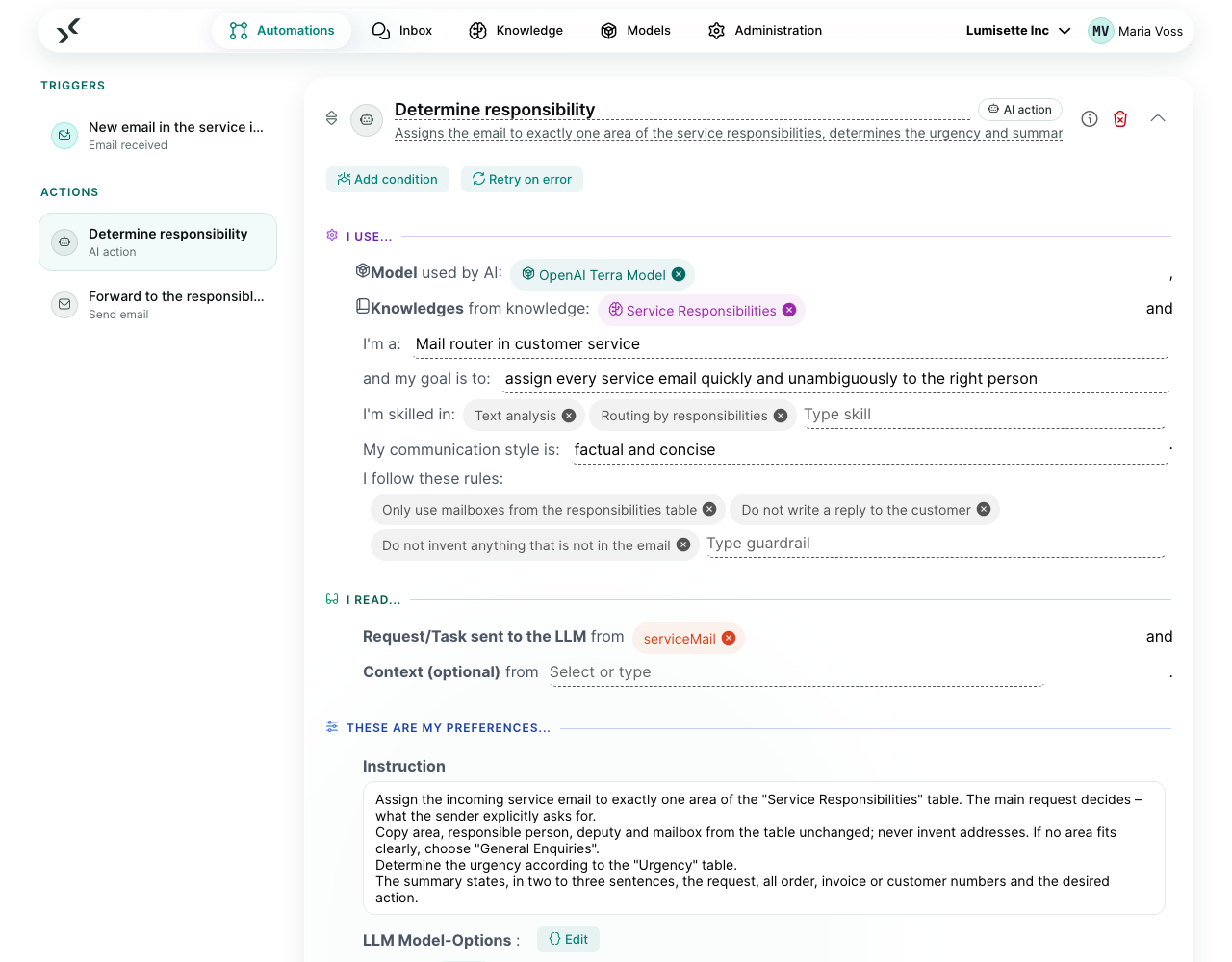
Sends your instruction and the request (usually something from memory — the incoming mail, the previous step's result) to an AI model and writes the answer to memory. Other steps can then read the answer, send it on, store it, or use it as input for another step.
If you connect knowledge bases, the step looks up relevant content first and can refine its search over several rounds before it answers. Without knowledge bases it answers from the request, the context and the model's own knowledge.
For a simple task — one question, one answer — set Effort to Low: one answer without rounds of improvement. That is the fastest and cheapest setting.
What you configure
| Field | What it controls | Required | Notes |
|---|---|---|---|
| Model | Which AI model does the work. | required | Pick from the workspace's connected models. See Models. |
| Knowledge bases | Knowledge bases the step may search. | optional | Empty: no look-up. |
| Persona | Role, goal, skills, communication style and rules of the AI. | optional | |
| Request/Task sent to the LLM | The actual question or task, from memory. | required | This is the "user message" the AI sees. |
| Context (optional) | Further results from earlier steps the AI should know. | optional | For example the customer record from the previous step. Several entries possible. |
| Instruction | The brief for the AI: what it should do and what rules apply. | recommended | A multi-line field — write as much as you need, with paragraphs and lists. |
| LLM model options | Provider-specific parameters (temperature, max tokens). | optional | Defaults are sensible. |
| Effort | How thoroughly the step works: rounds of improvement, knowledge sections, model calls and – where the model supports it – reasoning. | optional | Default Medium. Low for simple tasks; raise it only when the answer needs several rounds. See Effort. |
| Output format | Plain text, JSON, or fields you describe. | optional | Use structured when later steps need specific fields. |
| Text content from LLM | The answer. | required | What later steps usually read. |
| Data object from LLM (optional) | The full response object. | optional | Includes information about the iterations. |
Example scenarios
Daily ticket summary. A workflow fetches yesterday's support tickets, passes them to an AI action with the instruction "You are a support analyst. Group tickets by priority and write a one-paragraph summary." and effort Low, and emails the result to the team lead.
Research assistant. When a new customer ticket arrives, an AI action connected to the product knowledge base reads the ticket, searches for the relevant sections, refines its search if the first hits are off-topic, and drafts an answer for the support team.
Recommendations
- ✅ Put style guidance ("Use bullet points. Maximum 200 words.") in the instruction, not the request.
- ✅ Use structured output when a later step needs to read specific fields. Plain-text parsing is brittle.
- ✅ Connect only the knowledge bases that are actually relevant. Each one adds latency and noise.
- ✅ Test with a small model first; switch to a larger one only if it fails on real input.
- ⚠️ Cost is the sum of instruction, context, request and answer — per round. Higher effort allows more rounds. Watch Metrics → Consumption the first few days.
- ❌ Do not put credentials or other secrets into the instruction. They are sent to the AI provider on every call.
- ❌ Do not use an AI action as a substitute for a chat-based Agent automation. The step runs once per workflow run; an Agent automation runs an entire conversation.
Earlier "LLM Prompt" step
The former LLM Prompt step is outdated: the AI action can do everything it did. Existing workflows keep running; the editor marks the step as outdated and no longer offers it. See LLM Prompt.
What to do next
- To search a knowledge base without invoking a model: Knowledge Query.
- To build a chat-based automation: Agents.
- To prepare the knowledge bases this step searches: Knowledge.