Effort
Agents and the AI action have one switch for how thoroughly the AI works: Effort. It replaces the former Max. iterations setting.
| Level | When to use it |
|---|---|
| Low | Simple, high-volume tasks: one question, one answer. Fastest and cheapest. |
| Medium (default) | Most automations. Same behaviour as before the switch existed. |
| High | Harder tasks with several look-ups or tools. |
| Extra high | Long research or multi-step work with sub-agents. |
| Ultra (almost unlimited) | Rare, demanding tasks where quality matters more than cost. Still has limits – nothing runs forever. |
What the switch controls
The switch always sets the limits of the AI Kit itself – regardless of the model or provider:
| Low | Medium | High | Extra high | Ultra | |
|---|---|---|---|---|---|
| Agent: answers per user turn before it waits for the user | 2 | 5 | 8 | 12 | 20 |
| AI action: rounds of improvement | 1 | 10 | 15 | 25 | 50 |
| Tool rounds within one model request | 4 | 10 | 15 | 25 | 50 |
| Model calls per user turn (agent incl. sub-agents) or per step | 10 | 30 | 60 | 120 | 400 |
| Time limit per model request | 60 s | 120 s | 3 min | 5 min | 10 min |
| Knowledge sections the AI reads | 4 | 8 | 12 | 16 | 24 |
| Tailored search queries per knowledge base | no | yes | yes | yes | yes |
| Hits per search of the knowledge tool | 3 | 5 | 8 | 10 | 15 |
| Sub-agents: depth | 1 | 2 | 3 | 4 | 5 |
| Sub-agents: answers per call | 2 | 5 | 8 | 12 | 20 |
| Time limit of a workflow used as a tool | 1 min | 2 min | 5 min | 10 min | 30 min |
In the agent editor, a line below the switch shows what the chosen level allows.
When a limit is reached, the AI is not cut off mid-way: it is told that the limit is reached and gives its answer with what it has.
For an agent with sub-agents, the agent the user talks to sets the budget, depth and time limits for the whole turn. A sub-agent with a higher effort cannot extend them; it only thinks and searches with its own effort.
Reasoning effort per model
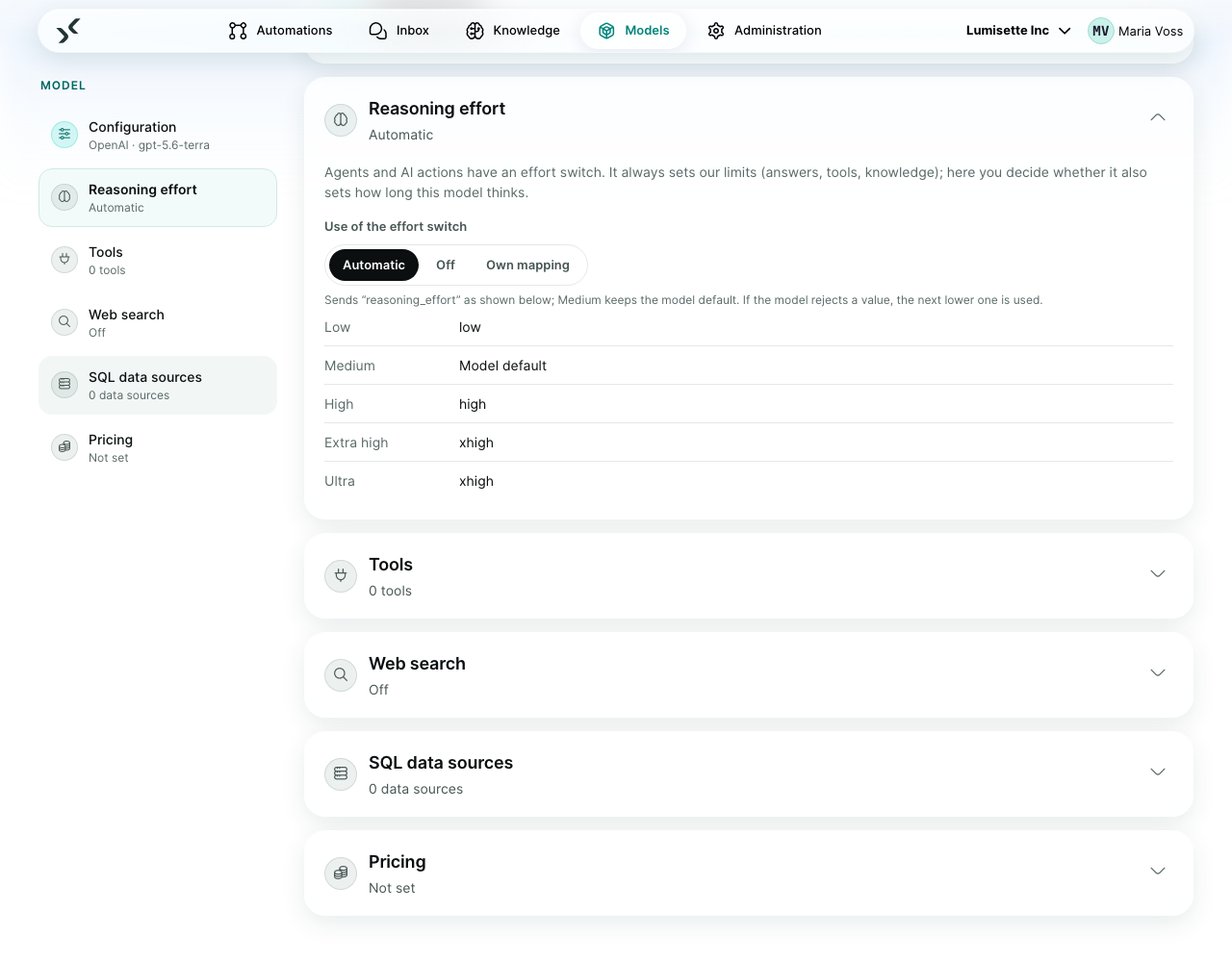
Many models can also think longer or shorter. Whether the effort switch controls that is set per model, under Models → (model) → Reasoning effort:
- Automatic (default) – Low, High, Extra high and Ultra are passed on to the model; Medium keeps the model's own default. If a model does not accept a value, the next lower one is used, or none at all – the AI Kit remembers that.
- Off – the model always thinks at its default.
- Own mapping – you pick the value per level, for example for a self-hosted model that can think.
| Provider | What is sent |
|---|---|
| OpenAI | reasoning_effort (low … xhigh) |
| Anthropic | effort (low … max) |
| Ollama | think – only with Own mapping, because many models do not support it |
| Mistral | nothing – the model decides itself |
Older automations
Agents and AI actions that still have Max. iterations get the nearest level automatically – the smallest level that allows at least as many rounds as before (for example 1 → Low, 8 answers per turn → High). The new value is stored the next time you save.
Recommendations
- ✅ Start with Medium. Switch to Low for simple, frequent steps – it saves the most.
- ✅ Raise the effort for a single agent or step, not everywhere.
- ⚠️ Higher effort means more model calls and tokens. Watch Metrics → Consumption after raising it.
- ❌ Do not use Ultra as a default. It is for the rare task that needs it.
What to do next
- Agents – where the switch sits in the agent editor.
- Integrations → AI action – the switch in a workflow step.
- Agent Tools – how effort limits sub-agents and workflows used as tools.