Einführung
Das schnell.digital AI Kit ist eine Plattform zum Bauen von Automationen – kleinen Programmen, die ein KI-Modell mit Ihren Daten, Ihren Anwendungen und Ihren Mitarbeitenden verbinden. Sie schreiben dafür keinen Code, sondern setzen Bausteine in einem visuellen Editor zusammen.
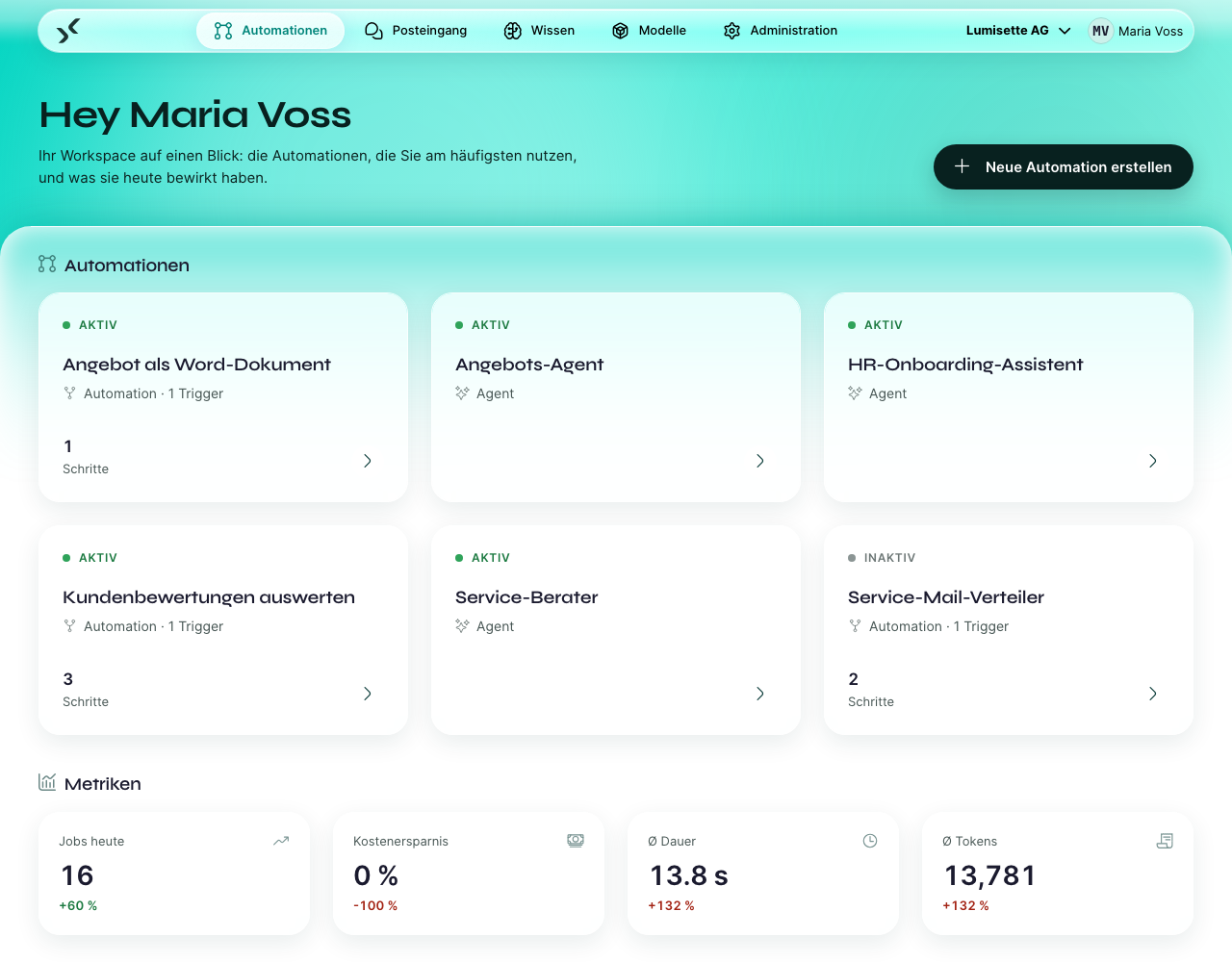
Diese Seite stellt die Begriffe vor, die in der gesamten Dokumentation verwendet werden. Zwei Minuten Lesezeit hier ersparen Ihnen später viele Klicks.
Die Bausteine
Workspace
Ein Workspace ist ein abgegrenzter Bereich für ein Team, einen Kunden oder eine Abteilung. Er hat eigene Benutzer, eigene Automationen, eigene Modelle und eigene Kontingente. Die meisten Organisationen kommen mit einem Workspace aus; Agenturen oder Beratungen betreiben oft mehrere.
Automation
Eine Automation ist das, was Sie bauen. Es gibt sie in zwei Varianten:
- Ein Workflow läuft selbstständig von Anfang bis Ende, wie ein kleines Programm. Beispiel: Jeden Morgen um 7:00 Uhr die Support-Tickets vom Vortag abrufen, zusammenfassen und die Zusammenfassung per E-Mail an die Teamleitung schicken.
- Ein Agent führt eine Konversation mit einem Benutzer. Beispiel: ein HR-Assistent, mit dem neue Kolleginnen und Kollegen schon am ersten Tag chatten können.
In der gesamten Plattform heißen beide „Automationen“. Der Unterschied spielt nur beim Bauen eine Rolle.
Trigger
Ein Trigger legt fest, wann die Automation läuft: zu einer festen Uhrzeit, bei einer eingehenden E-Mail, über einen Webhook, wenn ein Benutzer einen Chat beginnt oder wenn ein Agent den Workflow als Werkzeug braucht. Ein Workflow kann mehrere Trigger haben und läuft, sobald einer davon auslöst; ein Agent beginnt immer mit einem Chat oder einem Formular.
Schritte
Nach dem Trigger führt die Automation eine Folge von Schritten aus. Jeder Schritt erledigt genau eine Sache – ein KI-Modell aufrufen, eine Datenbank abfragen, eine E-Mail senden, etwas in einer Wissensbasis nachschlagen, eine Datei schreiben. Die meisten Automationen haben zwischen zwei und zehn Schritten.
Modelle
Ein Modell ist eine KI-Engine. Das AI Kit betreibt selbst keine KI – es kommuniziert mit Anbietern wie OpenAI, Anthropic, Mistral oder mit einem selbst betriebenen Ollama. Bevor Sie Automationen bauen, binden Sie mindestens ein Modell an Ihren Workspace an.
Wissen
Eine Wissensbasis ist eine Sammlung Ihrer eigenen Dokumente, Webseiten oder Datenbankeinträge, die die KI durchsuchen kann. So beantwortet das AI Kit Fragen wie „Was sagt unsere Reiserichtlinie zu Auslandsflügen?“, ohne Ihre Daten ins öffentliche Internet zu tragen.
Integrationen
Integrationen sind die Bausteine für Schritte und Trigger. Dazu gehören zum Beispiel „E-Mail senden“, „HTTP-Anfrage ausführen“, „Datenbankabfrage“, „Geplante Aufgabe“ oder „E-Mail eingegangen“. Der Katalog wächst laufend – siehe Automationen → Integrationen.
Posteingang
Im Posteingang arbeiten die Benutzer tatsächlich mit dem AI Kit. Sie beginnen Konversationen mit Agenten, übernehmen Aufgaben, die Workflows an sie übergeben, und lesen Ergebnisse. Endanwender sehen in der Regel nur den Posteingang.
Metriken
Jeder ausgeführte Schritt wird gemessen – Token, Dauer, Kosten, Erfolg oder Fehler. Im Bereich Metriken sehen Sie die Nutzung je Automation.
Wer macht was
| Rolle | Typische Aufgaben |
|---|---|
| Endanwender | Chattet im Posteingang mit Agenten und übernimmt Aufgaben aus Workflows. |
| Editor | Baut und bearbeitet Automationen, Modelle und Wissensbasen. |
| Manager | Alles, was ein Editor kann, dazu benutzerbezogene Einstellungen. |
| Admin | Alles: Benutzer, Lizenzierung, Workspace-Einstellungen, Serverzustand. |
| Monitor | Lesender Zugriff auf den gesamten Workspace – für Prüfer oder Stakeholder. |
Die vollständige Rollenhierarchie ist unter Administration → Benutzer verwalten beschrieben.
Nächste Schritte
- Wenn Sie die Plattform zum ersten Mal einrichten, lesen Sie weiter unter Installation und Einrichtung.
- Wenn die Plattform bereits läuft und Sie gerade eine Einladung erhalten haben, springen Sie zu Posteingang → Erste Anmeldung.
- Wenn Sie schon angemeldet waren und Ihre erste Automation bauen möchten, gehen Sie zu Automationen → Neue Automation erstellen.