Einführung
Der Reiter Metriken zeigt Ihnen, was in Ihrem Workspace geschieht – wie viel, wie oft, wie teuer und wie zuverlässig. Er hat zwei Aufgaben:
- Kostenkontrolle – was kostet jede Automation tatsächlich an Token beim KI-Anbieter?
- Betriebsüberblick – welche Automationen sind langsam, welche schlagen fehl, welche laufen unbemerkt gar nicht mehr?
Dieser Bereich erklärt, was gemessen wird, wie Sie die Diagramme lesen und wie Sie Daten für weitere Auswertungen exportieren.
Was gemessen wird
Jeder Schritt jeder Automation erzeugt Metriken. Die Plattform erfasst:
- Anzahl der Token – Eingabe- plus Ausgabe-Token je Modellaufruf.
- Geschätzte Kosten – Token multipliziert mit dem Preis je Token, der zum Zeitpunkt der Erfassung am Modell hinterlegt war. Die Kosten erscheinen in der Währung des Workspace (Administration → Workspace-Einstellungen → Formate). Umgerechnet wird nichts: Die Preise, die bei der Auswahl eines Modells vorgeschlagen werden, sind die Listenpreise der Anbieter in US-Dollar – passen Sie sie am Modell an, wenn Sie die Kosten in Ihrer eigenen Währung sehen möchten.
- Dauer – wie lange der Schritt gedauert hat, in Millisekunden.
- Erfolg / Fehler – wurde der Schritt sauber abgeschlossen?
- Summe je Lauf – die Summen der obigen Werte über alle Schritte eines Laufs.
- Summe je Automation – die Summen über alle Läufe in einem Zeitraum.
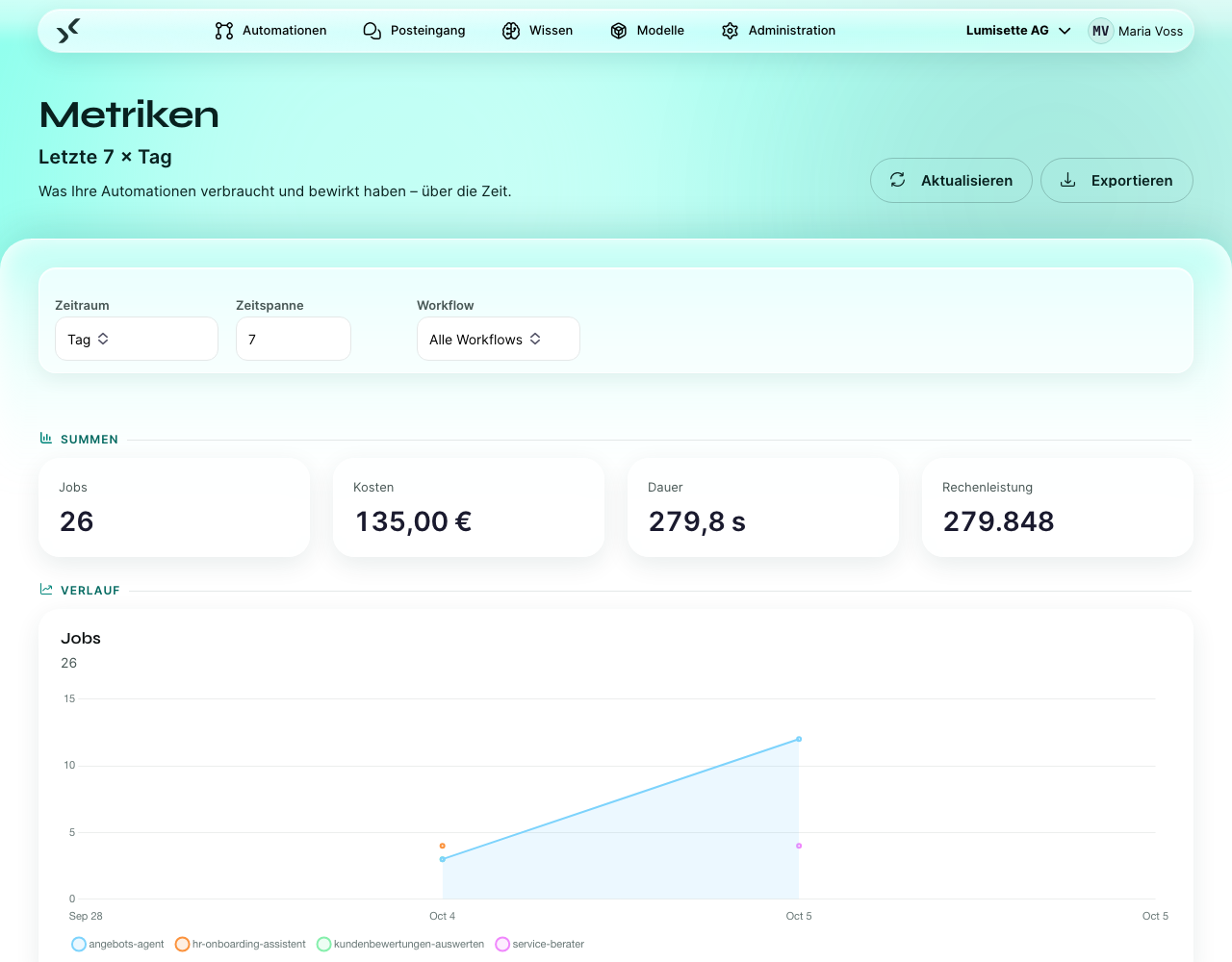
Zeitliche Auflösung
Sie entscheiden, wie die Daten aufgeteilt werden:
- Tag – Balken für die letzten N Tage.
- Woche – Balken für die letzten N Wochen.
- Monat – Balken für die letzten N Monate.
Der Regler für die Zeitspanne neben der Auswahl des Zeitraums bestimmt N. Die Voreinstellungen sind sinnvoll gewählt – 30 Tage, 12 Wochen, 6 Monate.
Nach Automation filtern
Standardmäßig zeigt der Reiter Metriken alles im Workspace. Mit dem Automations-Filter beschränken Sie die Ansicht auf eine einzelne Automation. Typischerweise gehen Sie so vor:
- Ihnen fallen hohe Gesamtkosten auf.
- Sie filtern nacheinander auf jede Automation und finden den Ausreißer.
- Sie öffnen diese Automation, finden den verantwortlichen Schritt und verfeinern entweder den Prompt, wechseln zu einem kleineren Modell oder ändern den Zeitplan.
Was nicht gemessen wird
- Die tatsächliche Rechnung des Anbieters. Die Plattform zeigt eine Schätzung auf Basis der veröffentlichten Preise. Maßgeblich für die tatsächlichen Kosten ist die Rechnung des Anbieters – meist liegen beide nur wenige Prozent auseinander.
- Embedding-Kosten bei der Aktualisierung von Wissensbasen. Sie werden getrennt von den Kosten der Automationen erfasst. Siehe Wissen → Aktualisierung.
- Speicherkosten. Das AI Kit berechnet nichts für Speicherplatz. Wenn Sie On-Premise betreiben, sind Ihre Speicherkosten das, was Ihre eigene Infrastruktur kostet.
- Zeit der Endanwender. Die Zeit, die Menschen im Posteingang verbringen, erfasst die Plattform nicht als Metrik.
Wie genau ist die Kostenschätzung
Die Anzahl der Token stammt direkt aus der Antwort des Anbieters. Der Preis je Token wird pro Modell konfiguriert und angepasst, wenn Anbieter ihre Preise ändern. Die geschätzten Kosten sind deshalb so genau wie die Preiskonfiguration – meist genau, in Übergangsphasen gelegentlich um einige Prozent daneben.
Für absolute Genauigkeit bei der Abrechnung gleichen Sie einmal im Monat mit der Rechnung des Anbieters ab.
Nächste Schritte
- Verbrauch der Automationen – die Diagramme lesen und deuten.
- Analysieren und exportieren – die Zahlen aus dem AI Kit herausholen.