Lizenzierung
Die tägliche Verwaltung von Lizenzdateien, Kontingenten und Upgrades.
Die grundlegende Einführung (Testlizenz oder Standardlizenz, was eine Lizenz steuert) finden Sie unter Erste Schritte → Lizenzierung. Diese Seite ist die Referenz für den Betrieb.
Die Lizenzseite
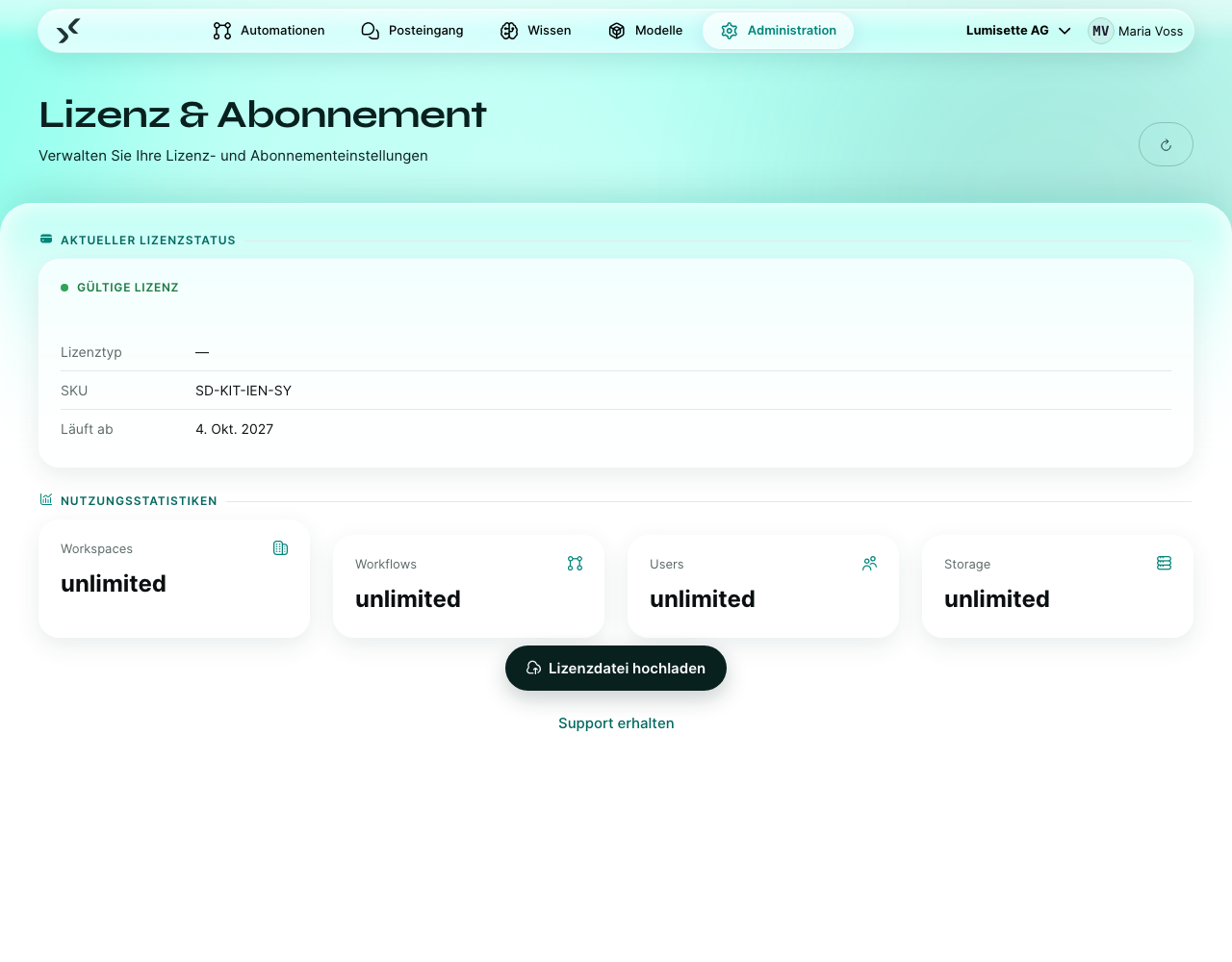
Öffnen Sie Administration → Lizenz & Abonnement. Die Seite zeigt:
- Aktueller Lizenzstatus – Typ (Testlizenz, Standard, Enterprise), Ablaufdatum, Name der Organisation aus der Lizenzdatei.
- Nutzungsstatistiken – jedes Kontingent mit aktueller Nutzung und Grenze. Der Balken füllt sich, je näher Sie der Grenze kommen.
- Lizenzdatei hochladen – ersetzt die aktuelle Lizenz durch eine neue Datei.
- Lizenz upgraden – Link zum Kauf oder Upgrade.
- Support erhalten – Knopf für den direkten Kontakt.
Die Kontingentbalken verstehen
Jeder Balken zeigt zwei Zahlen: wie viel Sie verbraucht haben und wo die Grenze liegt.
- Grün – reichlich Spielraum.
- Gelb – die Grenze rückt näher. Planen Sie vor.
- Rot – Grenze erreicht oder überschritten. Einige Vorgänge sind jetzt gesperrt.
Übliche Kontingente:
| Kontingent | Gezählt wird |
|---|---|
| Workflows | Anzahl der Automationen jeder Art im Workspace. |
| Benutzer | Anzahl der verschiedenen Benutzerkonten, die sich im Workspace anmelden können. |
| Modelle | Anzahl der eingerichteten Modellverbindungen. |
| Wissen | Anzahl der eingerichteten Wissensbasen. |
| Workspaces | Anzahl der Workspaces in der Installation (nur in der globalen Ansicht relevant). |
Steht ein Kontingent auf 100 %, lehnt die Plattform das Anlegen neuer Elemente in diesem Kontingent ab, hält bestehende aber nicht an.
Die Lizenzdatei ersetzen
- Öffnen Sie die Lizenzseite.
- Klicken Sie auf Lizenzdatei hochladen.
- Wählen Sie die
.lic-Datei aus, die Sie erhalten haben.
Die neue Lizenz gilt sofort. Die Seite lädt neu und zeigt Übersicht und Kontingente auf dem neuen Stand.
Mögliche Gründe, wenn das Hochladen fehlschlägt:
- Die Datei wurde bearbeitet (Lizenzdateien sind signiert; Änderungen machen die Signatur ungültig).
- Die Datei gehört zu einer anderen Installation (Lizenzdateien sind an eine Installations-ID gebunden).
- Die Datei ist beschädigt (selten; laden Sie sie erneut über den ursprünglichen Lieferweg herunter).
Vor dem Ablauf verlängern
Lizenzdateien haben ein Ablaufdatum. Eine Verlängerung schiebt dieses Datum hinaus – meist um ein weiteres Jahr. So läuft die Verlängerung ab:
- Wenden Sie sich an Ihren Ansprechpartner (oder nutzen Sie Support erhalten).
- Sie erhalten eine neue
.lic-Datei. - Laden Sie sie auf der Lizenzseite hoch.
Sie können die neue Datei jederzeit hochladen, bevor die alte abläuft. Das System verwendet jeweils die gültige.
Was beim Ablauf passiert
Ist beim Ablauf der alten Lizenz keine neue eingespielt:
- Testlizenz → der Workspace wechselt in einen schreibgeschützten Zustand. Benutzer können sich anmelden, Inhalte ansehen und frühere Ergebnisse einsehen. Neue Automationen laufen nicht; bestehende Automationen stoppen beim nächsten Auslösen.
- Standard / Enterprise → wie bei der Testlizenz, zusätzlich mit einer Übergangsfrist, die die ausstellende Organisation festlegt. Die genaue Dauer der Übergangsfrist steht in Ihrem Vertrag.
Sobald Sie eine gültige Lizenz hochladen, ist der Workspace innerhalb von Sekunden wieder freigegeben.
Wachsende Kontingente im Blick behalten
Die Plattform sendet Lizenzbenachrichtigungen an die Kontakt-E-Mail des Workspace (siehe Workspace verwalten), wenn:
- ein Kontingent 80 % seiner Grenze überschreitet,
- die Lizenz in weniger als 30 Tagen abläuft,
- die Lizenz abgelaufen ist.
Stellen Sie sicher, dass jemand die Kontakt-E-Mail im Blick hat.
Empfehlungen
- ✅ Prüfen Sie die Lizenzseite monatlich. Gelbe Balken sind Frühwarnungen.
- ✅ Planen Sie Lizenzverlängerungen mindestens 30 Tage vor dem Ablauf. Manche Beschaffungsprozesse dauern länger als erwartet.
- ✅ Bewahren Sie für den Notfall eine Kopie der aktuellen Lizenzdatei außerhalb des AI Kit auf (in Ihrem Passwortmanager oder einem Dokumentationssystem).
- ⚠️ Eine neue Lizenzdatei ersetzt die vorherige. Sobald Sie eine neue hochgeladen haben, ist die alte weg – und ab diesem Moment gelten die Kontingente der neuen.
- ⚠️ Kontingente gelten für den Workspace, in dem die Ressource liegt. Gemeinsam genutzte Ressourcen (Benutzer, die es in mehreren Workspaces gibt) zählen für jeden Workspace einzeln.
- ❌ Löschen Sie im Notfall keine Automationen, nur um im Kontingent Workflows Platz zu schaffen. Setzen Sie sie stattdessen auf inaktiv – sie laufen dann nicht mehr, zählen aber, je nach Vertragsbedingungen, nur bei manchen Plänen weiter zum Kontingent.
- ❌ Bearbeiten Sie keine
.lic-Dateien. Sie sind signiert.
Nächste Schritte
- Erste Schritte → Lizenzierung – die grundlegende Einführung.
- Metriken → Analysieren und exportieren – mit den Rechnungen der Anbieter abgleichen.