Trigger-Monitor
Ein Workflow läuft nur, wenn sein Trigger auslöst. Ist ein Trigger defekt – falsche Zugangsdaten, nicht erreichbarer Mailserver, fehlerhaftes Webhook-Geheimnis –, arbeitet der Workflow unbemerkt nicht mehr. Der Trigger-Monitor macht genau solche Fälle sichtbar.
Der Trigger-Monitor liegt unter Administration → Trigger-Monitor.
Was die Seite zeigt
Die Seite listet jeden aktiven Workflow des Workspace zusammen mit dem aktuellen Status seines Triggers auf:
| Status | Bedeutung |
|---|---|
| Ausstehend | Der Trigger wurde angefordert, ist aber noch nicht gestartet. Übergangszustand. |
| Wird gestartet | Der Trigger wird initialisiert (Verbindung zum Mailserver, Registrierung eines Cron-Jobs …). |
| Läuft | Der Trigger ist in Ordnung und wartet auf Ereignisse. Der Normalzustand. |
| Wird neu gestartet | Der Trigger hat sich von einem vorübergehenden Fehler erholt und verbindet sich neu. |
| Fehler | Der Trigger kann wegen eines dauerhaften Fehlers nicht starten. Hier muss jemand eingreifen. |
| Gestoppt | Der Trigger wurde bewusst deaktiviert. Kein Problem. |
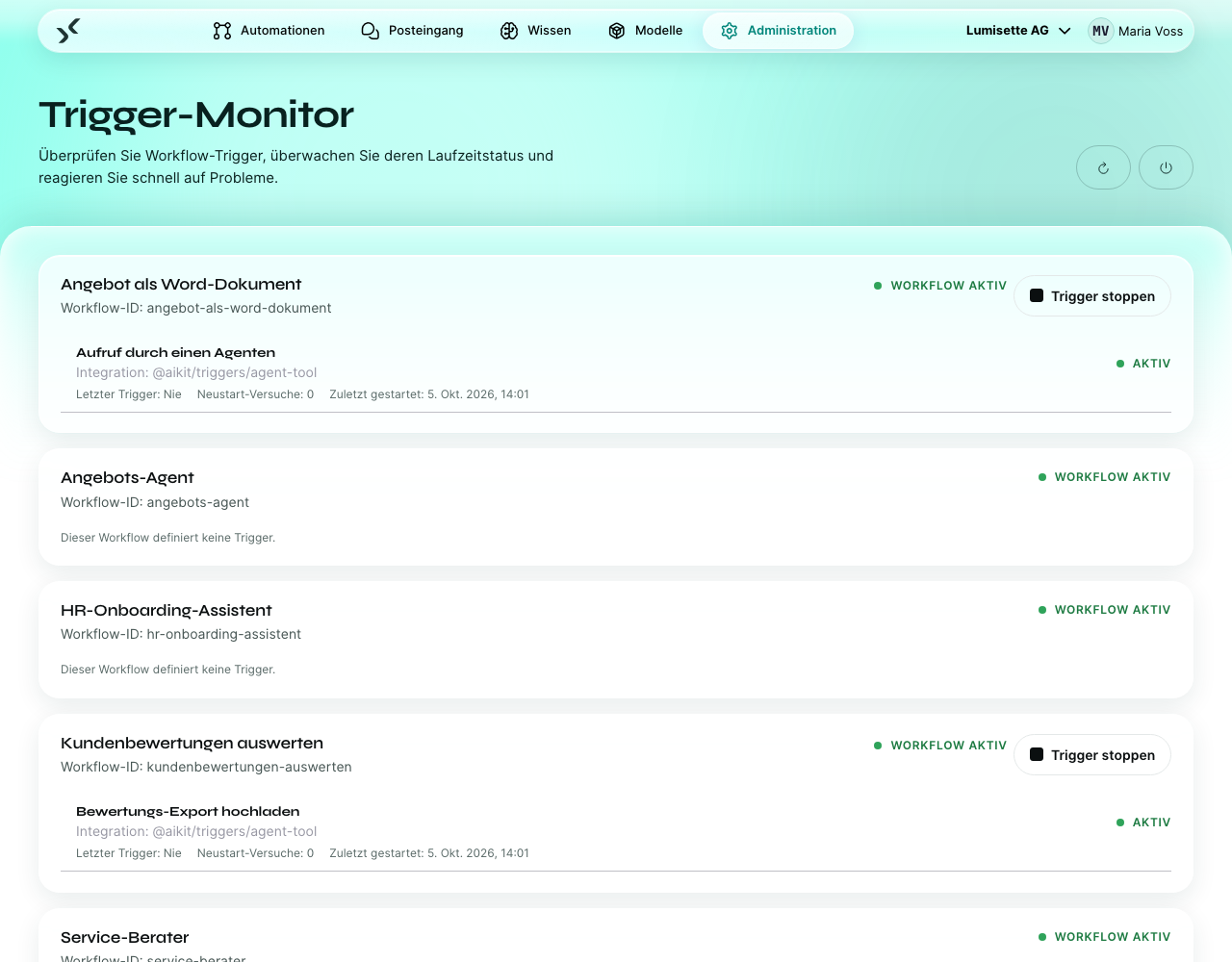
Meist ist die Seite ein Meer aus Grün. Wertvoll wird sie in dem Moment, in dem eine Zeile rot ist.
Wenn ein Trigger rot ist
Klicken Sie auf die Zeile, um die Fehlermeldung zu sehen, die der Trigger gemeldet hat. Häufige Ursachen nach Art des Triggers:
| Trigger | Häufige Ursache |
|---|---|
| E-Mail eingegangen | IMAP-Zugangsdaten falsch oder widerrufen. Mailserver nicht erreichbar. |
| HTTP-Webhook-Empfänger | Keine zu erwarten – Webhooks scheitern selten auf Trigger-Ebene. Fehler entstehen durch fehlende Konfiguration (z. B. ist der gemeinsame Schlüssel leer). |
| Datenbank-Überwachung | Datenbank nicht erreichbar. SQL ungültig. Zugangsdaten widerrufen. |
| Dateisystem-Überwachung | Überwachter Pfad existiert nicht oder ist nicht lesbar. |
| Cloud-Speicher-Überwachung | MinIO-Zugangsdaten falsch oder Bucket fehlt. |
| Kalender-Ereignisüberwachung (ICS) | Die URL liefert keinen gültigen Feed mehr. |
| Google Kalender | OAuth-Verbindung auf Google-Seite widerrufen. |
| Geplante Aufgabe | Schlägt so gut wie nie fehl – Cron-Ausdrücke werden beim Speichern geprüft. |
Die Behebung sieht meist so aus:
- Die Trigger-Konfiguration im Workflow-Editor bearbeiten.
- Die Zugangsdaten aktualisieren (Passwort neu einfügen, OAuth-Verbindung erneuern …).
- Speichern.
- Zum Trigger-Monitor zurückkehren. Der Trigger sollte innerhalb von Sekunden zu starten versuchen; falls nicht, verwenden Sie Alle Trigger neu starten oder Trigger starten (siehe unten).
Verfügbare Aktionen
- Aktualisieren – den aktuellen Status aller Trigger neu abrufen.
- Alle Trigger neu starten – startet alle laufenden Trigger neu. Nützlich nach einer serverweiten Konfigurationsänderung oder auf Anweisung des Supports.
- Trigger starten bei einem einzelnen Workflow – startet nur den Trigger dieses Workflows neu. Nutzen Sie das, wenn Sie gerade eine Konfiguration korrigiert haben und die anderen nicht anfassen möchten.
Neustarts unterbrechen Läufe dieser Trigger, die gerade ausgeführt werden. Sie sind sicher, stören aber kurzzeitig – laufende Webhook-Aufrufe liefern Fehler, geplante Läufe verpassen ihren Termin.
Wie der Monitor mit dem Deaktivieren zusammenhängt
Der Schalter im Workflow-Editor (aktiv / inaktiv) und der Status im Trigger-Monitor hängen zusammen, sind aber nicht dasselbe:
- Der Schalter sagt, ob der Trigger laufen soll.
- Der Monitor sagt, in welchem Zustand der Trigger tatsächlich ist.
Setzen Sie einen Workflow auf inaktiv, zeigt der Monitor Gestoppt. Setzen Sie ihn wieder auf aktiv, durchläuft der Monitor innerhalb von Sekunden Ausstehend → Wird gestartet → Läuft. Fehler sind die Ausnahme; genau deshalb fallen sie auf.
Empfehlungen
- ✅ Prüfen Sie den Trigger-Monitor bei jeder produktiven Installation einmal täglich. Rote Zeilen bleiben meist rot, bis jemand hinsieht.
- ✅ Behandeln Sie Fehler als einzigen Status, der Aufmerksamkeit braucht. Ausstehend / Wird gestartet / Wird neu gestartet sind per Definition vorübergehend.
- ✅ Ergänzen Sie den Monitor um einen externen Alarm (ein einfaches, per Cron ausgeführtes Skript, das den Status ausliest und bei Fehlern jemanden benachrichtigt).
- ⚠️ Alle Trigger neu zu starten ist unbedenklich, stört aktive Trigger aber kurzzeitig. Verwenden Sie lieber Trigger starten bei einem einzelnen Workflow, wenn Sie nur eine Sache korrigiert haben.
- ⚠️ Ein Trigger im Status Fehler kann sich von selbst erholen (vorübergehende Netzwerkprobleme). Warten Sie eine Minute, bevor Sie davon ausgehen, eingreifen zu müssen.
- ❌ Löschen Sie keinen Workflow, nur damit ein roter Trigger verschwindet. Deaktivieren Sie stattdessen den Trigger – der Workflow ist die maßgebliche Quelle für die Konfiguration.
Nächste Schritte
- Systemzustand – die Serverseite desselben Bildes.
- Automationen → Workflows – den Trigger im Workflow selbst korrigieren.