OpenAI
Verbinden Sie die Modelle von OpenAI – die GPT-5.6-Familie, die kleineren GPT-5.4-Varianten und Embedding-Modelle – mit Ihrem Workspace.
Was Sie brauchen
- Einen OpenAI-API-Schlüssel mit aktivierter Abrechnung. Sie erstellen ihn auf der OpenAI-Plattform unter „API keys“.
- Die Modell-ID, die Sie verwenden möchten (siehe Empfehlungen unten).
- Ein paar Minuten.
Schritt für Schritt
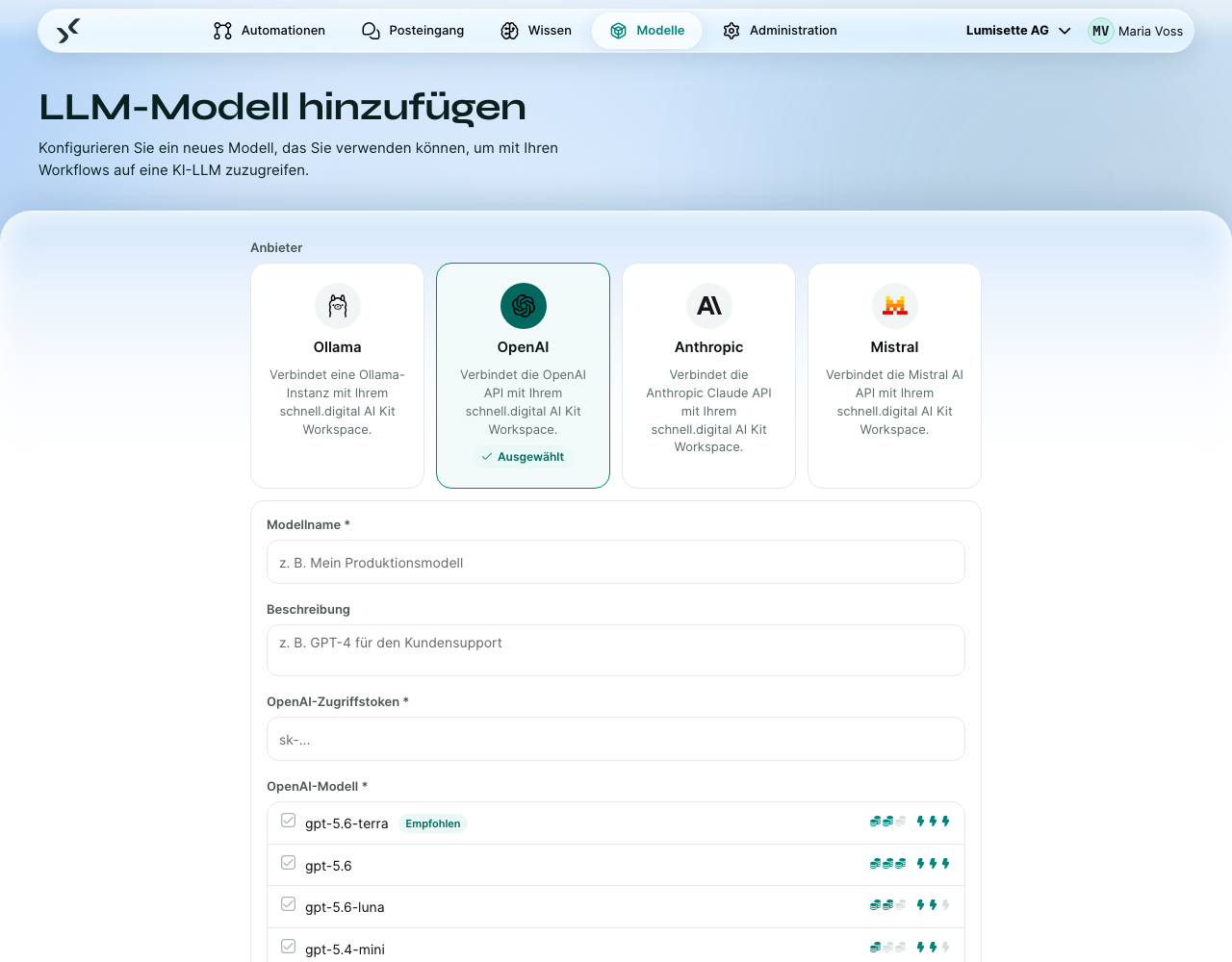
- Öffnen Sie den Reiter Modelle und klicken Sie auf Neues Modell konfigurieren.
- Wählen Sie OpenAI als Anbieter.
- Geben Sie einen Anzeigenamen ein. Empfehlung: Nehmen Sie den Modellnamen auf, z. B. „OpenAI GPT-5.4 mini“.
- Wählen Sie das Modell, zum Beispiel
gpt-5.4-mini, oder wählen Sie Benutzerdefiniert / Andere und tragen Sie eine ID ein, die die Liste nicht anbietet. - Tragen Sie Ihren API-Schlüssel in das geschützte Feld ein.
- Wählen Sie das Modell aus der Liste. Für Embeddings binden Sie ein zweites OpenAI-Modell an und wählen über die Option Benutzerdefiniert / Andere eine Embedding-ID (z. B.
text-embedding-3-small) – Chat und Embedding sind im Workspace getrennte Verbindungen. - Klicken Sie auf Erstellen. Das Modell wird gespeichert und steht im Workspace zur Verfügung.
Empfohlene Modell-IDs
Die genaue Liste ändert sich mit der Zeit. Als allgemeine Orientierung:
| Bedarf | Modell-ID | Hinweise |
|---|---|---|
| Schneller und günstiger Chat | gpt-5.4-mini | Guter Standard für die meisten Automationen. |
| Hochwertiger Chat und Schlussfolgerungen | gpt-5.6-terra | Die empfohlene Standardwahl; gpt-5.6 kostet noch einmal mehr. |
| Embeddings (Standard) | text-embedding-3-small | Günstig und für die meisten Wissensbasen genau genug. |
| Embeddings (hohe Genauigkeit) | text-embedding-3-large | Mehr Dimensionen; bessere Trefferquote bei schwierigen Daten. |
Wählen Sie, was zu Ihrem Anwendungsfall passt. Veröffentlicht OpenAI ein neueres Modell, tragen Sie einfach dessen ID in das Feld ein – das AI Kit sperrt unbekannte IDs nicht.
Preise
OpenAI rechnet je Token ab, getrennt nach Eingabe und Ausgabe, bei Embeddings ebenfalls je Token. Die aktuellen Preise stehen auf der Preisseite von OpenAI. Die Kosten werden Ihrem Konto belastet; siehe BYOK.
Ratenlimits und Kontingente
OpenAI setzt Ratenlimits je Organisation und je Modell. Die Limits steigen mit dem Alter Ihres Kontos und mit steigenden Ausgaben. Schlagen Automationen mit Ratenlimit-Fehlern fehl, prüfen Sie Ihr OpenAI-Dashboard – möglicherweise müssen Sie eine Erhöhung des Limits beantragen.
Empfehlungen
- ✅ Erstellen Sie einen eigenen API-Schlüssel für das AI Kit. Benennen Sie ihn so, dass Sie ihn widerrufen können, ohne andere Anwendungen zu beeinträchtigen.
- ✅ Binden Sie zu Beginn ein Chat-Modell und ein Embedding-Modell an. Fügen Sie weitere nur hinzu, wenn eine bestimmte Automation ein anderes Modell braucht.
- ✅ Setzen Sie im OpenAI-Dashboard ein monatliches Ausgabenlimit, bis Sie ein Gefühl für die Kosten haben.
- ⚠️ OpenAI nimmt gelegentlich ältere Modell-IDs außer Betrieb. Funktioniert ein Modell plötzlich nicht mehr, prüfen Sie die Abkündigungshinweise von OpenAI.
- ❌ Verwenden Sie keinen Schlüssel eines persönlichen Kontos, wenn der Workspace für die Firma bestimmt ist. Verlässt die Person das Unternehmen, fällt jede Automation aus.
Nächste Schritte
- Binden Sie zum Vergleich einen weiteren Anbieter an: Anthropic, Mistral.
- Behalten Sie die Daten auf Ihrer eigenen Infrastruktur: Ollama (selbst betrieben).
- Verstehen Sie BYOK genau: Bring-your-own-Key.