Mistral
Connect Mistral AI's models to your workspace.
What you need
- A Mistral API key. Create one in the Mistral console under "API keys".
- The model ID you want to use.
- A few minutes.
Step by step
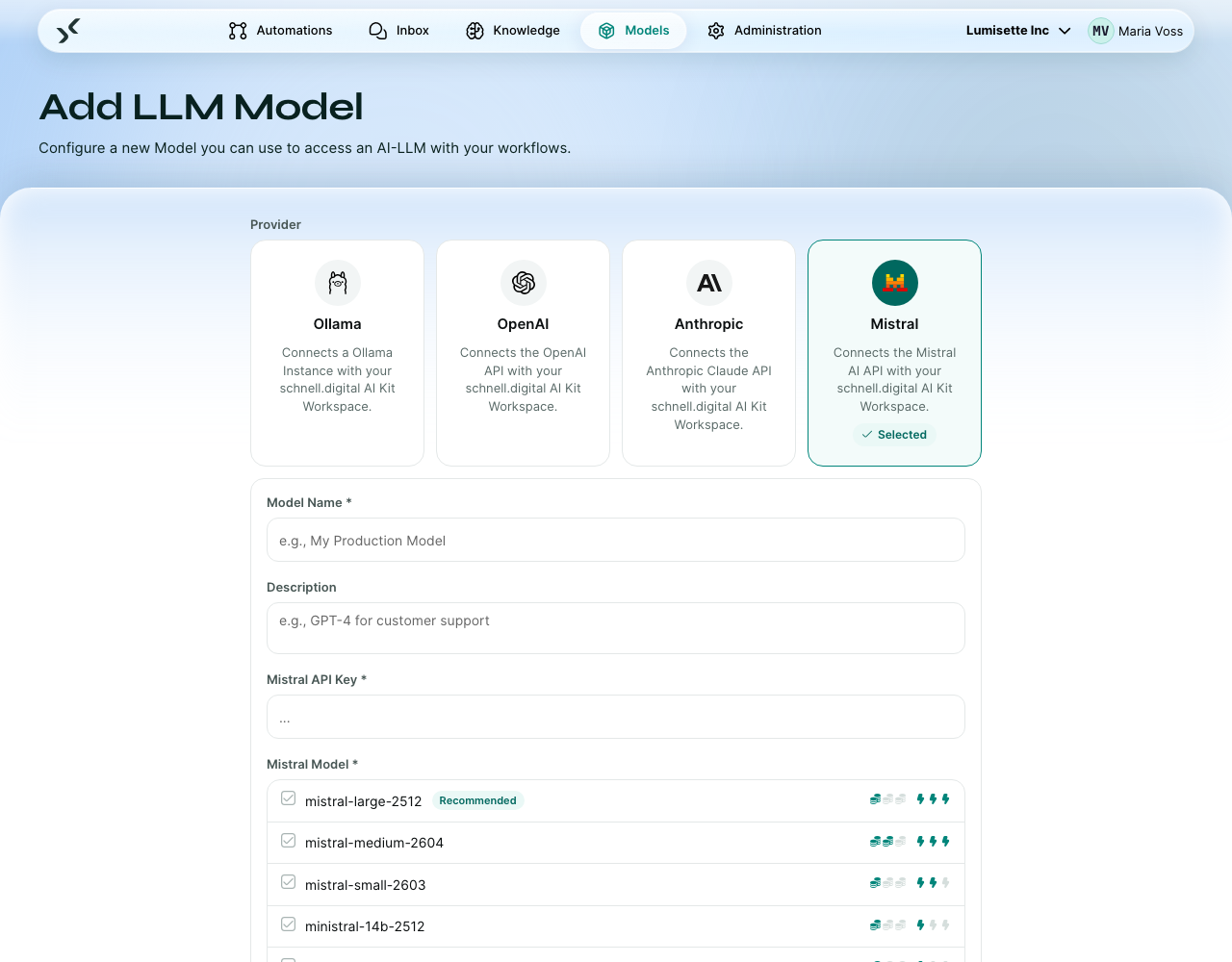
- Open the Models tab and click Configure new Model.
- Pick Mistral as provider.
- Enter a display name. Suggested: "Mistral Large" or "Mistral Embed".
- Pick the model, for example
mistral-large-2512. For an ID the list does not offer, choose Custom / Other and type it. - Enter your API key in the secured field.
- Pick the model from the list. For embeddings, connect a second Mistral model and pick
mistral-embedvia the Custom / Other option if it is not pre-listed — chat and embedding are separate connections in the workspace. - Click Create. The model is saved and available in the workspace.
Recommended model IDs
| Need | Model ID | Notes |
|---|---|---|
| Fast and inexpensive chat | mistral-small-2603 | Strong default for most automations. |
| High-quality chat | mistral-large-2512 | The recommended default; mistral-medium-2604 sits between the two. |
| Embeddings | mistral-embed | Mistral's first-party embedding model; connect it via Custom / Other. |
| Code | codestral-2508 | Mistral's coding model. |
Why pick Mistral
The most common reason is European hosting. Mistral is a French company; its API is served from the EU. Organizations with EU-data-residency requirements often prefer Mistral over US-based providers for that reason.
The models themselves are competitive across the size spectrum. Performance varies by task — benchmark with your own data before committing.
Pricing and rate limits
Mistral bills per token, separately for input and output. Rate limits are per minute and per day, set per account. Both are documented in the Mistral console.
Recommendations
- ✅ For workspaces with EU-data-residency constraints, prefer Mistral for chat and embeddings.
- ✅ Connect a small and a large model. Many workflows do triage with the small one and only escalate to the large one when needed.
- ✅ Use
mistral-embedfor new knowledge bases. Keep it consistent across knowledges that should be searched together. - ⚠️ Mistral's API is closer in spirit to OpenAI's than Anthropic's, but small differences remain. If you switch from one provider to another, test prompts you rely on.
- ❌ Do not assume EU hosting is the same as on-premise. The data still leaves your network. For full on-premise, use Ollama.
What to do next
- For US-based alternatives: OpenAI, Anthropic.
- For fully on-premise: Ollama (Self-hosted).