Anthropic
Connect Anthropic's Claude models to your workspace.
What you need
- An Anthropic API key. Create one in the Anthropic console under "API keys".
- The model ID you want to use (see recommendations below).
- A few minutes.
Step by step
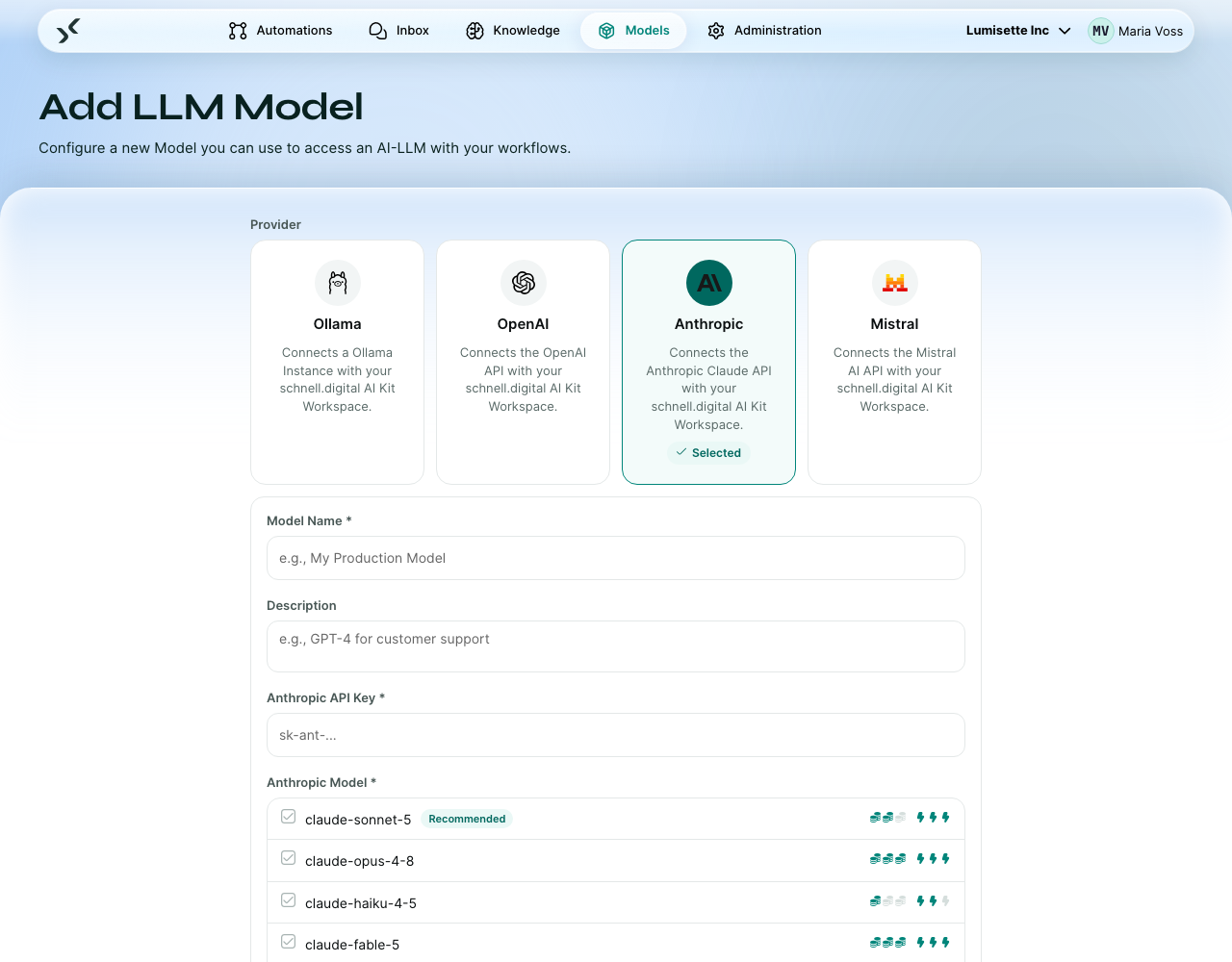
- Open the Models tab and click Configure new Model.
- Pick Anthropic as provider.
- Enter a display name. Suggested: include the model name, e.g. "Anthropic Claude Sonnet".
- Pick the model, for example
claude-sonnet-5, or choose Custom / Other and type an ID the list does not offer. - Enter your API key in the secured field.
- Pick the model from the list. Anthropic only ships chat models — for embeddings, connect an OpenAI or Mistral embedding model in addition (see Models → Introduction).
- Click Create. The model is saved and available in the workspace.
Recommended model IDs
| Need | Model ID | Notes |
|---|---|---|
| Fast and inexpensive chat | claude-haiku-4-5 | Quickest of the Claude family. |
| Balanced quality & cost | claude-sonnet-5 | The recommended default for most automations. |
| Highest quality | claude-opus-4-8 | More expensive; use for hard tasks. claude-fable-5 sits above it again, but requires 30-day data retention on the provider side. |
If Anthropic releases a newer model, type its ID in the field. The -latest suffix usually resolves to the newest version of a model family.
Pricing
Anthropic bills per token, separately for input and output. Current rates are on Anthropic's pricing page. The bill goes to your account; see BYOK.
Rate limits
Anthropic enforces per-minute and per-day token limits, with separate limits per model. If you see rate-limit errors, look at the dashboard for the relevant limit and request an increase if needed.
Embeddings — note
Anthropic does not offer a first-party embedding model. If your workspace uses knowledge bases, connect an embedding model from another provider (OpenAI text-embedding-3-small is a common default). The chat and embedding models do not need to come from the same provider — they are used independently.
Recommendations
- ✅ Create a dedicated API key for the AI Kit.
- ✅ Start with
claude-sonnet-5for chat. It hits the right balance for most automations. - ✅ For embeddings, pair Anthropic chat with an OpenAI or Mistral embedding model.
- ⚠️ The
-latestalias points to whatever Anthropic considers current. If you need a stable behavior, pin to a specific version ID. - ❌ Do not assume an Anthropic key gives access to embeddings — it does not.
What to do next
- OpenAI for an embedding model to pair with.
- Mistral for a European-hosted alternative.
- Bring-your-own-Key for the full picture on keys and billing.