Logging and Compliance
This page describes what the AI Kit logs — what is recorded, where it lives, who can see it, how long it is kept, and what to do about retention and audit.
What the platform logs
The platform writes three streams of information about activity:
Application log
Standard server log: startup messages, errors, internal warnings. Written to the platform's stdout / stderr and (in containerized deployments) usually captured by the container runtime.
- Contains: version, environment, runtime errors, warnings about misconfigurations.
- Does not contain: workflow content, user input, model responses.
- Retention: controlled by your container runtime / log shipping system, not by the AI Kit.
Job log
For every run of every automation, a per-job log records what happened step by step.
- Contains: which step ran, when it started and ended, success or failure, error messages, brief metadata about the values processed.
- Does not contain: the values themselves at the application-log level. The full step values live in the memory of the job, which is its own area (see below).
- Retention: workflow jobs are pruned by a configurable retention period. Agent conversations are deleted after a period without activity (60 days by default).
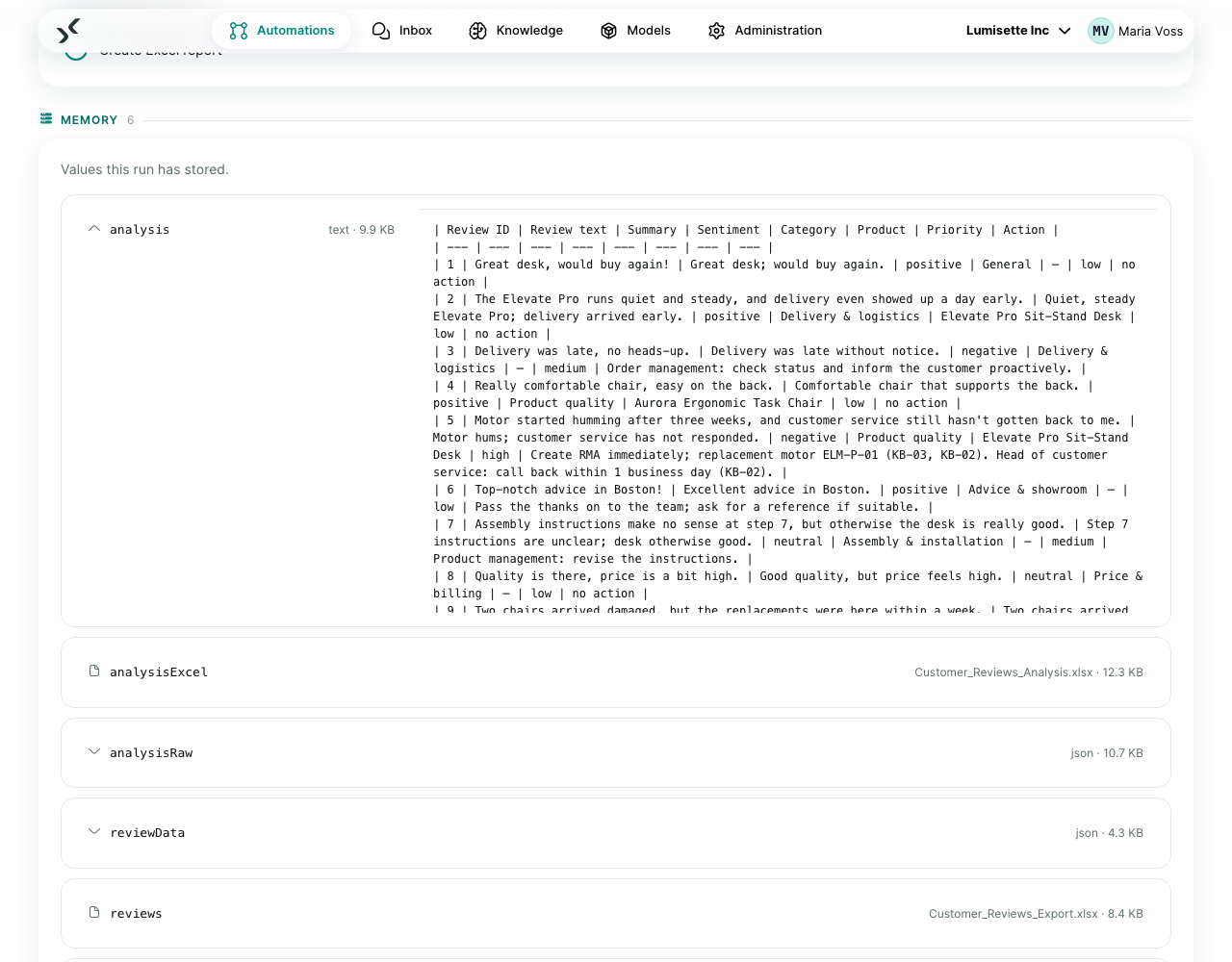
Job memory
The full values written by each step during the run. This is the bulk of the data and is what makes the Jobs view useful for debugging.
- Contains: every input pulled from memory, every output written back, the full text of model requests and responses (unless deliberately redacted by your workflow).
- Retention: identical to the job — pruned for workflows, deleted after inactivity for agents.
What is not logged
- Secured-field values never appear in plaintext anywhere on disk. Logs reference them by an opaque marker.
- Provider API keys for models are stored encrypted and not logged.
- One-time codes for login are stored only as long as they are valid — typically minutes — and not logged.
- User passwords are stored hashed and not logged.
Who can see what
| Audience | What they can see |
|---|---|
| Admin / Manager / Editor in a workspace | All automations, all jobs (including memory), all logs within the workspace. |
| Monitor in a workspace | Same as above, but read-only — may start runs. |
| AgentUser | In the Inbox, only their own conversations with agents – plus what a workflow hands to the team (questions, approvals, delivered files). No automations, jobs or logs. |
| Operators of the host | The application log (via the container runtime), the data volume on disk, the encrypted secured fields. |
If you need finer-grained access than this (for example "people who can see automations but not job memory"), the platform does not currently offer that distinction. Plan workspaces and roles accordingly.
Retention
The platform stores all per-job data on the data volume. Two retention policies are worth understanding:
- Workflow jobs are automatically moved to an archive area after a configurable retention period and eventually purged. By default the retention is 30 days; check your installation's settings to confirm.
- Agent jobs (conversations) are deleted after a period without activity — 60 days by default (
AGENT_JOB_RETENTION). Files attached to or created in a conversation are deleted with it.
If your compliance regime requires shorter or longer retention, set both retention periods accordingly.
If your compliance regime requires longer retention, copy the data volume regularly to a backup location with the required retention policy.
Audit logs
The Audit log records who changed, triggered, downloaded or unsuccessfully attempted what, and when: changes to automations, knowledge, models and settings (with the changed fields), role changes and invitations, manual and webhook starts, downloads, denied access, and sign-ins (including failed ones). It holds only metadata, never content, is protected against later modification by a keyed checksum chain, can be exported as CSV or JSON, and can be forwarded as JSON lines to central log management (SIEM).
What happened inside a run is recorded in the job history. Each job records:
- Which trigger fired it (cron, webhook, mail, user).
- Who started it, if the trigger is user-initiated (chat, form, manual run).
- Each step's start and end time, success status, and error if any.
- The complete sequence of values that flowed between steps (in memory).
For external audit consumers, the export options are:
- The export of the Audit log (CSV, via the API also JSON) covers changes, starts, downloads, denied access and sign-ins.
- The CSV export from the Metrics tab covers aggregate cost/duration/success per period.
- A direct read of the data volume covers full job history at the per-job level. This requires custom tooling on your side; the platform does not currently offer a "bulk export of job memory" feature in the user interface.
Compliance considerations
A short list of points that frequently come up:
- GDPR right to erasure. You can delete a workspace, a user, a workflow, or a specific job from the user interface. The corresponding data on disk is removed during the next scheduled prune. For an immediate hard-delete (e.g., after a subject access request), use the explicit delete action.
- GDPR right to access. The job history is per-user when triggered by users, and a Monitor-role user can read everything in a workspace. For producing an export tied to a specific subject, you currently combine workspace access with manual filtering.
- Sector-specific (financial, health, public-sector) regimes. These usually impose retention floors and access-control ceilings. The platform's roles + retention controls cover most common cases; specific regulations require a fit-gap analysis we cannot do in this document.
- Data-residency requirements. On-premise installations keep all data on your premises. Cloud installations run in regions you select at contract time.
For specific obligations, work with your data-protection officer or counsel. The platform provides the controls; the policy is yours.
Recommendations
- ✅ Decide a retention period that satisfies both your compliance and your debugging needs. Tighter is better, but tight retention means less history to look at when something goes wrong.
- ✅ Periodically delete old agent conversations that no longer serve a purpose. They never expire on their own.
- ✅ Treat the data volume as confidential — its content is at least as sensitive as the data that flows through the platform.
- ✅ For audit-heavy environments, set up a read-only Monitor user for auditors. They can see everything and start runs, but change nothing.
- ⚠️ Log levels and verbosity are global for the installation. Increasing log verbosity for debugging adds detail to all workspaces' application log temporarily.
- ❌ Do not edit job logs or memory files directly on the data volume. The platform may rely on file integrity in ways that are not obvious; manual edits can leave the system in a confused state.
- ❌ Do not assume "logs do not contain sensitive data" without checking. If a workflow puts sensitive data into memory, the Jobs view will show it.
What to do next
- Data Privacy in Automations — keep sensitive data out of places it should not be.
- Pseudonymization — the practical anonymize/deanonymize pattern.
- Administration → Manage Users — roles and access.
- Security → Local Resources — what lives on the data volume.